REVIEW · ESIM & TRAVEL CARDS
South Korea eSIM (3-30 days. Up to 45GB)
Book on Viator →Operated by Xplori · Bookable on Viator
Good internet starts before you land. This South Korea eSIM from Xplori helps you stay connected with local-rate mobile data, using a QR-code activation that gets you online within minutes. It’s built for real trip needs too: navigation, messaging, and sharing plans with family without the airport SIM hassle.
I like two things most. First, I appreciate the simple setup: get the eSIM by email, scan the code, and you’re connected fast. Second, I like that the data experience is designed around local 4G/5G access where available, with enough allowance for planning your days and getting around.
One consideration: you need an eSIM-compatible phone to use it, and high-speed data is capped—after the included amount, your speed drops to 3G. In one tip, I also recommend planning for a restart if activation feels stuck.
In This Review
- Key highlights worth knowing
- What this eSIM actually does for your South Korea trip
- Price and value: why $5 can be a smart move
- Before you go: phone compatibility and what to check
- Activation in minutes: how to get online without drama
- Seoul days: using data for maps, plans, and staying in sync
- Day trips and coverage reality: Seoul plus beyond
- Speed cap: when 4G/5G turns into 3G
- Staying connected to avoid real travel headaches
- Customer support that won’t leave you hanging
- Who this eSIM is best for
- Quick checklist before you book
- Should you book this eSIM for South Korea?
- FAQ
- How do I receive the eSIM?
- How do I activate the eSIM?
- What phone models work with this eSIM?
- Does it work in Seoul, South Korea?
- Is it 4G or 5G?
- How much data do I get?
- Will I still have internet after the high-speed data cap?
- What if my eSIM does not fully activate right away?
- Is customer support included?
Key highlights worth knowing
- Email delivery, no physical pickup: your eSIM arrives digitally so you can prep before departure
- QR-code activation that works quickly: scan and connect within minutes
- Local network behavior: the eSIM connects to the best local network automatically
- 4G/5G where available: fast enough for maps, streaming, and video calls in normal use
- Speed cap to watch: after your included data amount, speeds switch to 3G
- Remote help by email: customer service is available if you hit a snag
What this eSIM actually does for your South Korea trip
This isn’t a tour with a guide meeting you at a corner. It’s simpler, and that’s the point. You’re buying mobile data access for South Korea so you can use your phone like you live there—maps, translation, social apps, and basic planning—without swapping SIM cards or fighting with signage at the airport.
You choose a duration between 3 and 30 days, and you get mobile data for that time. The plan includes high-speed data up to the stated allowance (up to 45GB), and if you exceed it, data speed switches to 3G. That structure matters because it’s what keeps the price so low: you get plenty of fast data for most travel days, but it’s not unlimited.
The best part for practical travelers: you receive the eSIM by email, then activate it with a QR code once you’re ready. No waiting in line. No language barrier at a counter. No temporary confusion trying to get a signal while your luggage is still half-unpacked.
You can also read our reviews of more tours and experiences in Seoul.



Price and value: why $5 can be a smart move
The listed price is $5.00 per person. That’s strikingly low for any kind of preloaded mobile connectivity for international travel. The value isn’t just the number—it’s the savings in time and stress.
Here’s what you’re really paying for:
- Avoiding airport purchases: you skip lines and last-minute decisions.
- Avoiding SIM swapping: you keep your phone setup clean.
- Getting connected quickly: activation in minutes means you can find your way sooner.
- Local-rate data access: you’re not stuck with slow or expensive roaming-style pricing.
Does that mean it replaces every other option? Not automatically. If you use massive amounts of video streaming daily, you might run into the speed cap earlier than you want. But for typical travel use—maps, messaging, checking schedules, and some streaming—the structure is built to cover you comfortably.
Also, because the eSIM is purely digital, it’s a low-commitment add-on. You’re not paying for logistics or physical handling. You’re paying for the ability to stay connected from the moment you need it.
Before you go: phone compatibility and what to check
Before you buy or activate anything, check one thing: your phone must support eSIM.
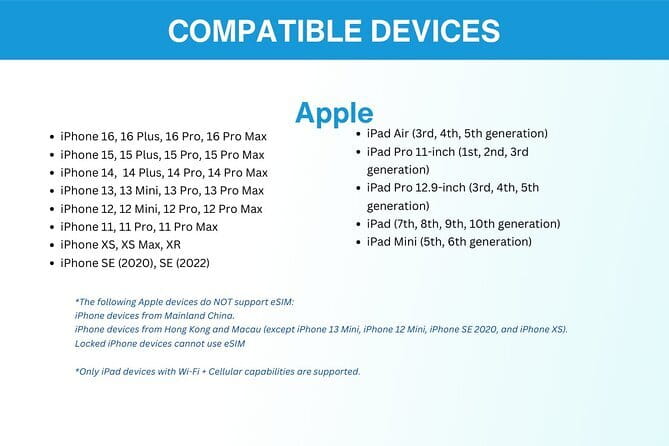
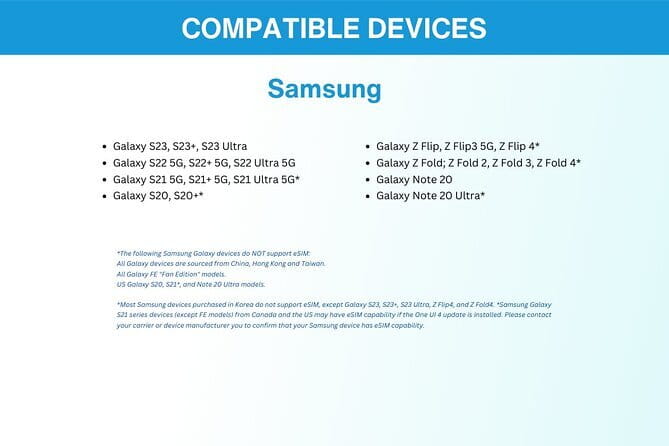
The information provided lists these examples:
- iPhone XS and later
- Google Pixel 3 and later
- Samsung S20 / S21 / Fold
If your phone isn’t on that list, it might still support eSIM, but you shouldn’t guess. Contact the provider in advance if you’re unsure. This is worth doing because the whole experience depends on scanning a QR code and loading an eSIM profile.
One more practical point: because it’s delivered digitally, you’ll want to make sure you can access your email on the day you arrive (or just before). If you’re traveling through airports with limited access, plan to have the email confirmation and the QR code ready before you land.
Activation in minutes: how to get online without drama
Activation is the moment where most travel tech either goes smoothly—or becomes a side quest. This one is designed to be straightforward.
What you’ll do:
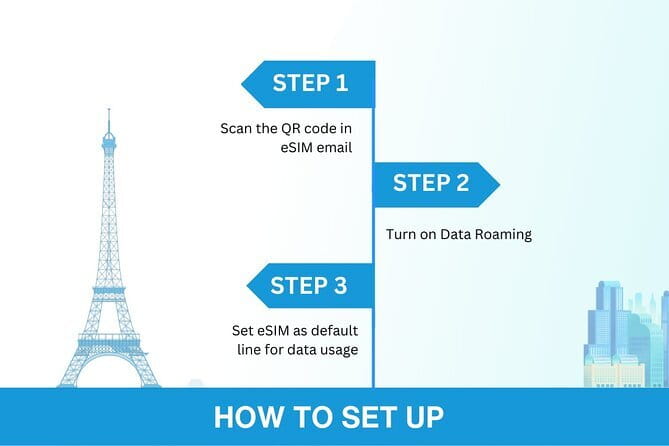
- Order and receive the eSIM by email.
- Scan the QR code.
- Activate the eSIM profile.
- Get connected within minutes.
In one practical tip shared through real-world feedback: if it doesn’t fully activate right away, restart your device. That’s not a big deal, but it’s a smart move to know ahead of time. If your phone seems connected but apps act offline, a quick reboot can fix it.
The tone of this setup is very travel-friendly. You’re not waiting on a physical SIM. You’re not coordinating pickup. And you’re not dealing with someone else’s slow keyboard in a language you don’t speak.
Seoul days: using data for maps, plans, and staying in sync
Once you’re activated, the main benefit is obvious: you can use your phone normally in Seoul, South Korea. That means navigating with live maps, searching transit info, and checking where you’re going next while you’re already walking.
This matters more than people think. In a city where signage and transit details might not match what you expected, the ability to quickly verify directions is huge. With working data, you spend less time second-guessing and more time moving.
You also get practical advantages beyond navigation:
- You can easily coordinate with friends or family.
- You can upload or share simple updates.
- Streaming and video calls can work well when you stay within the high-speed allowance.
In one experience note, the connection automatically picked the best local network, which helped keep signal steady across a trip that included Seoul and even travel to Jeju island. That kind of automatic behavior is exactly what you want: less manual fiddling, fewer dead spots caused by network switching choices.





Day trips and coverage reality: Seoul plus beyond
Your starting location is Seoul, and the experience ends back at the meeting point, but for an eSIM the more important question is: does it work when you leave the main city?
Here’s what’s supported by the info you have:
- The data plan provides mobile access for your selected duration.
- It supports 4G/5G where available.
- Reliable connectivity is reported across travel that extended from Seoul to Jeju island.
That’s a big deal if your plan includes islands or time outside the city center. You don’t want to rely on Wi-Fi hotspots. You want a phone that stays useful even when you’re on the move.
And because this is local-rate data access, you’re more likely to use it as your main connection instead of treating it like a backup.
Speed cap: when 4G/5G turns into 3G
The fine print that can make or break your day is the speed cap. Here’s the clear version:
- You get high-speed data up to the amount included in your plan (up to 45GB depending on option).
- After that, speed switches to 3G.
What does that mean for your phone use?
- Navigation usually still works, but loading may feel slower.
- Social apps can still function, but heavy use may become less pleasant.
- Streaming and video calls may get frustrating if you rely on high bandwidth.
The key is to think about your own habits. If you mostly use data for messaging, maps, and occasional browsing, the cap likely won’t bother you. If you plan to binge video every day, you’ll want to pick your duration carefully and watch your usage.
Staying connected to avoid real travel headaches

It’s easy to view an eSIM as just data. In practice, it’s about reducing small friction that adds up.
With this setup, you avoid the classic problems:
- You don’t arrive and immediately need to find a SIM shop.
- You don’t deal with activation menus in a new language.
- You don’t risk losing a whole afternoon to tech troubleshooting at the airport.
Instead, you get a setup that’s ready in advance and activates in minutes. That’s the difference between using your phone as a tool versus using it as a problem.
And there’s a bonus angle too: eSIMs can reduce plastic waste because there’s no physical SIM card. If you care about that, you can feel good about choosing a digital-first option without paying extra for it.
Customer support that won’t leave you hanging
The included support is remote and provided by email. That’s not an in-person concierge, but it’s still valuable if you need help with activation steps or troubleshooting.
When you’re dealing with phone settings, email support can be enough, especially since you’re only working through a QR code activation and profile setup. If you’re the type who likes to confirm details ahead of time, reaching out early is smart—particularly if your phone model sits close to the compatibility examples listed.
Who this eSIM is best for
This fits best if you:
- want to stay connected in Seoul with easy navigation and messaging
- plan day trips beyond the city (the provided experience includes Jeju island)
- prefer a simple, digital setup over buying a SIM on arrival
- want stable service and automatic local network behavior
It may be less ideal if:
- you need truly unlimited high-speed data with no slow-down period
- your phone isn’t eSIM compatible and you can’t confirm it ahead of time
Overall, it’s a good match for solo travelers, couples, and families who want reliable connectivity without turning phone setup into a mission.
Quick checklist before you book
If you’re deciding today, use this checklist:
- Confirm your phone supports eSIM using the examples provided.
- Choose a duration that fits your total trip length (3 to 30 days).
- Plan your data habits around the high-speed cap, especially if you stream a lot.
- Save the activation email so you can scan the QR code easily.
- If activation seems slow, be ready to restart your device.
Should you book this eSIM for South Korea?
Yes—if your priority is simple, fast connectivity without airport hassles, this is an easy buy. The price is very low, the activation is straightforward, and the connection approach (including automatic local network selection and reported reliability) is exactly what you want while traveling.
I’d skip it only if you already know you’ll exceed the high-speed allowance quickly and can’t tolerate speed dropping to 3G. Also, don’t book until you’re sure your phone supports eSIM—no one enjoys scrambling while jet-lagged.
For most trips that include navigating around Seoul and keeping your plans synced on the go, this eSIM is one of the most practical “set it up and forget it” travel upgrades you can make.
FAQ
How do I receive the eSIM?
You get the eSIM delivered to you by email after your order. You’ll use that information to activate it.
How do I activate the eSIM?
After you receive the email, scan the QR code and activate the eSIM profile. You should be connected within minutes.
What phone models work with this eSIM?
The info provided includes iPhone XS and later, Pixel 3 and later, and Samsung S20 / S21 / Fold. If you are unsure, contact the provider in advance.
Does it work in Seoul, South Korea?
Yes. The eSIM is for use in South Korea, starting in Seoul.
Is it 4G or 5G?
It provides 4G/5G access where available.
How much data do I get?
The plan offers up to 45GB at the high-speed level, depending on the duration option you select. After your included amount, speed switches to 3G.
Will I still have internet after the high-speed data cap?
Yes, you keep data access, but once the high-speed amount is used up, your speed switches to 3G.
What if my eSIM does not fully activate right away?
One practical tip is to restart your device to fully activate it.
Is customer support included?
Yes. You get remote customer service and can email for help if needed.