REVIEW · ESIM & TRAVEL CARDS
Gimpo Airport: Traveler SIM and T-money Transportation Card
Book on GetYourGuide →Operated by Roaming Star Inc · Bookable on GetYourGuide
Landing in Korea and immediately having maps and transit sorted is a big deal. This setup pairs an unlimited 4G LTE SIM with a ready-to-use T-money card, and a greeter helps you get connected at Gimpo Airport. I love how the staff assistance takes the guesswork out of activation, and I love the all-trip usefulness of having transit + data in one stop.
One thing to plan around: phone compatibility matters. You’ll need your phone fully free of carrier lock, and if you have a US-purchased iPhone 14, you may only be able to use eSIM, since there’s no physical SIM tray on those models.
In This Review
- Key Points You’ll Actually Care About
- Getting Your SIM and T-money at Gimpo Airport
- Unlimited 4G LTE: What It Changes for Your Trip
- T-money Basics: Subways, Buses, Convenience Stores, Taxis
- Your Trip Timeline: How 3 Days to 2 Months Works in Real Life
- Communication and Hotspot: The Included Bits and the Limits
- Price and Value: Is $12 Fair for What You Get?
- Phone Compatibility: The Stuff That Can Trip You Up
- Where You’ll Use This Most During Your Stay
- Who This Suits Best
- Should You Book This Gimpo SIM + T-money Setup?
- FAQ
- Where do I pick up the SIM and T-money card?
- Do I get help to activate the SIM?
- Is the mobile data unlimited?
- Does the T-money card work for public transportation?
- Do I need to charge the T-money card?
- Can I use T-money at convenience stores?
- Are taxis included with T-money?
- Can I use the SIM as a hotspot?
- Does this plan include outgoing calls and outgoing texts?
- What phone issues should I watch for?
- Is there a cancellation window?
Key Points You’ll Actually Care About
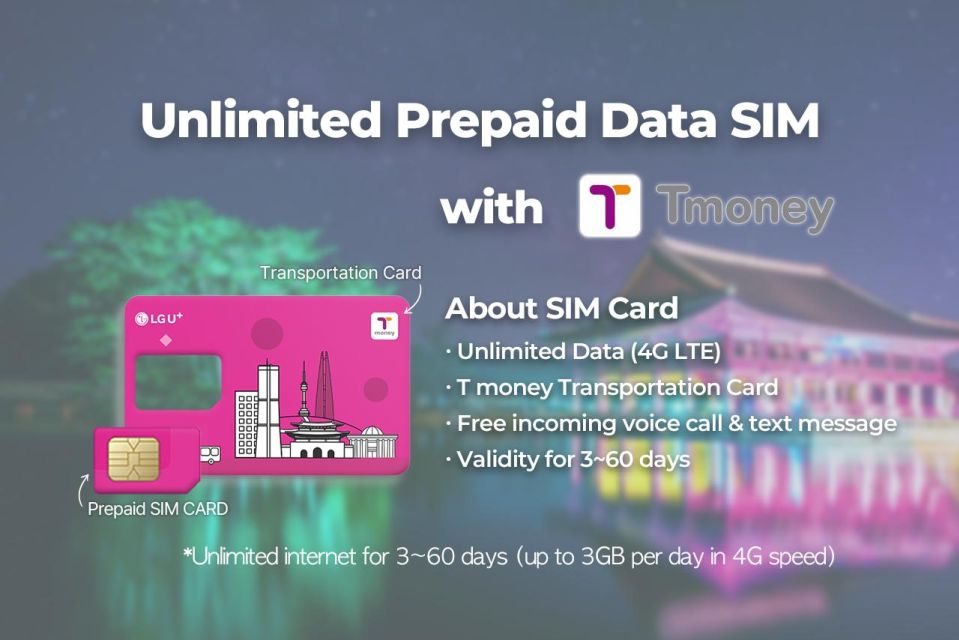
- Airport greeter support helps you activate data so you are online right away.
- Unlimited 4G LTE means you can use maps, translate, email, and social media without babysitting your data.
- T-money covers real daily life: subways, buses, convenience stores, and some card-accepting taxis.
- Hotspot is included, so you can share your connection on the road.
- Incoming calls and texts work, but outgoing calls and texts are not included.
- Trip length options run from 3 days to 2 months, so you can match the SIM to your pace.
Getting Your SIM and T-money at Gimpo Airport
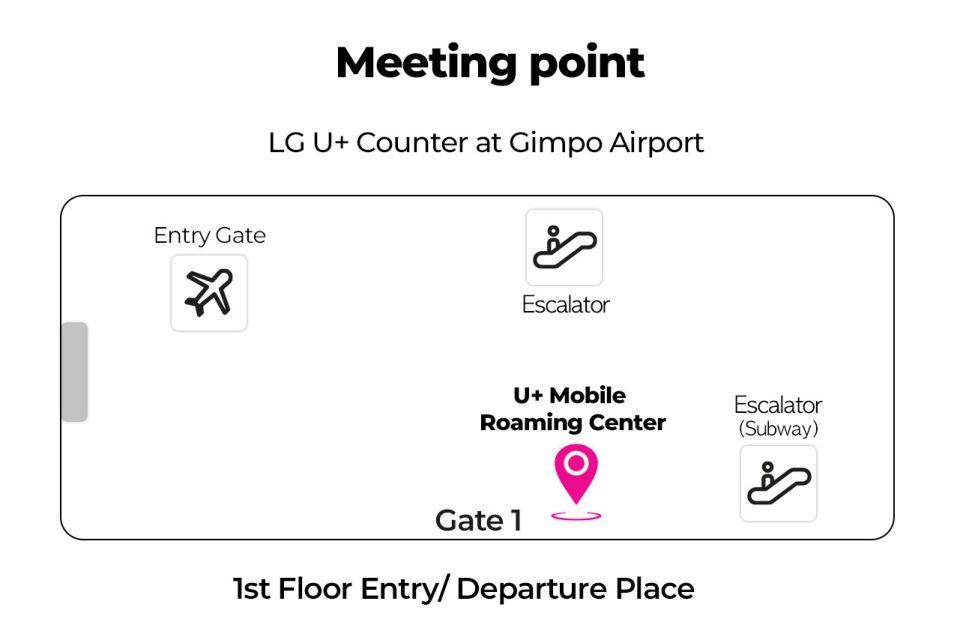
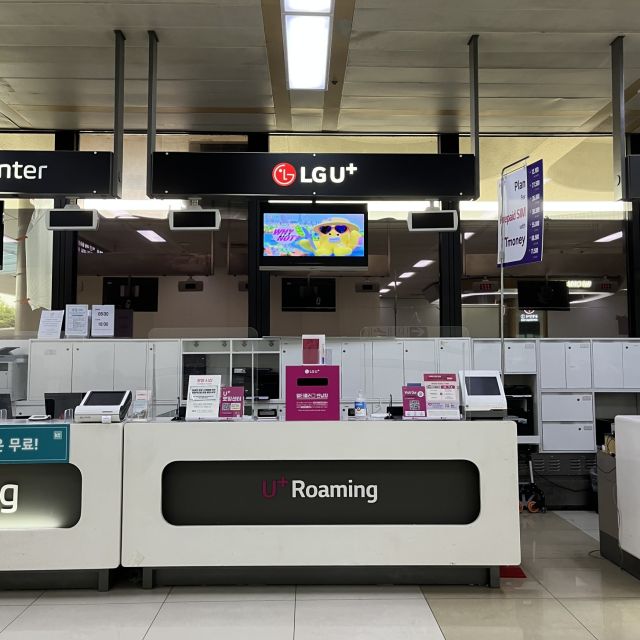
The whole experience starts at Gimpo Airport, where you pick up your SIM at an airport counter. You get help from a host or greeter (English or Korean) who checks that your phone is actually connected to data before you walk away. That one step saves time and stress, especially if your settings are picky or you are arriving late and just want to function.
Here is the practical rhythm I’d aim for:
- Land → go to the counter → get the SIM and T-money
- Have the greeter confirm data is working
- Leave with transit ready and your phone online
You’ll receive the data SIM in the right format for your phone (nano, micro, or normal). Then you’ll also get the T-money card, which is the public transportation card you can use for subways and buses. The key is simple: T-money is not magic until you charge it.
Also, keep your booking details in mind. The meeting point can vary depending on the option you booked, but the counter pickup at Gimpo is the core idea. If you want the smoothest arrival, plan to give yourself a little buffer time so you are not rushing while setting things up.
You can also read our reviews of more tours and experiences in Seoul.



Unlimited 4G LTE: What It Changes for Your Trip
Having unlimited 4G LTE is about more than scrolling. You are using data in small, constant ways: figuring out the right station, checking schedules, translating menus, uploading a photo, and messaging friends so you meet up without chaos.
This plan includes hotspot usage too. That matters if:
- you have a second device you want online (like a tablet or laptop),
- you are traveling with someone who needs a reliable connection,
- you do not want to rely on spotty airport or hotel Wi-Fi.
You also get incoming calls and text messages. That’s useful for the common real-world travel moments, like confirming plans when someone tries to reach you while you are out and moving.
What’s not included is outgoing calls and texts. So think of this SIM as your internet lifeline plus incoming communication, not as a full replacement for your home carrier. If you expect to make lots of phone calls or send messages from Korea like you would at home, you may need an alternate plan.
T-money Basics: Subways, Buses, Convenience Stores, Taxis
The second big win is that your transit card is built in. T-money is designed for public transport, specifically subways and buses, so you avoid the usual airport scramble of finding a reload machine or trying to figure out where your card balance went.
But T-money is useful beyond the train:
- You can use it at convenience stores for purchases.
- You can use it with accredited taxis that accept cards.
Before you hop on anything, do the one step that’s easy to skip: charge your transportation card. The card needs a balance to work. If you forget, you end up standing at the gate or in front of a machine trying to fix it mid-trip.
One more practical detail: your card usage is tied to the normal rhythm of contactless payments. That means fewer delays, and fewer situations where you need to find cash. In Korea, that convenience adds up fast, especially on days when you are bouncing between neighborhoods.
Your Trip Timeline: How 3 Days to 2 Months Works in Real Life
Your SIM duration options range from 3 days to 2 months. That sounds straightforward, but it matters for how you plan your travel flow. If you are moving fast and doing day trips, you will burn data quickly on maps, translations, and photo uploads. If you are staying longer in one area, you might rely more on routine, but you still want data for the moments that keep your day running.
Because you are getting data tied to a specific time window, I’d choose your option based on the number of days you’ll be out navigating. Not just the days you sleep in the hotel. The real data use is typically the time you spend discovering and traveling.
Also note the booking limit: the maximum number of purchases per passport is 3. That does not usually affect a single traveler, but it’s good to know if you are booking for a group or planning multiple extensions.
Communication and Hotspot: The Included Bits and the Limits
Let’s talk about the way this plan behaves day-to-day.
Included:
- Unlimited 4G LTE data
- Hotspot usage
- Incoming calls and text messages
Not included:
- Outgoing calls and outgoing text messages
So if you picture your phone as two layers—data + receiving communication—you are covered. If you picture it as a fully functioning calling/texting phone number for outward communication, this may fall short.
Here’s how I’d adapt your expectations:
- Use messaging apps and data-based calling (like internet-based options) for outgoing communication.
- Treat incoming calls/texts as a confirmation channel for plans already in motion.
Hotspot is a big deal if you are the kind of person who carries a second device for photos, itinerary planning, or work. You will appreciate not hunting for Wi-Fi every time you change locations.





Price and Value: Is $12 Fair for What You Get?
At $12 per person, this is priced like a practical tool, not a luxury add-on. You are not only buying a SIM. You are also getting a T-money card that you can use immediately for transit and other card-compatible purchases.
Value-wise, here’s what you are effectively paying for:
- Unlimited high-speed 4G LTE data for your full chosen duration window
- Staff assistance at the airport so your data connection is actually working
- A chargeable transit card so you can move around without extra setups
- Hotspot usage
- Incoming calls and texts
The biggest “value” detail is the greeter help. In the real world, a SIM that is technically active but not connected to data becomes dead weight. Getting someone to check your connection right at pickup is worth a lot, especially after travel fatigue.
So yes, $12 is low. But it’s low because you are buying function with smart boundaries: outgoing calling/texting is not included, and there’s no identity verification service.
Phone Compatibility: The Stuff That Can Trip You Up
Before you arrive, check your phone settings. The essentials are spelled out, and they matter.
1) Your phone needs to be fully free of carrier lock
The instructions specifically call out US, Canada, Japan, and the Philippines. If your phone is from one of those places and still locked to your home carrier, your SIM may not work as expected.
2) US-purchased iPhone 14 models may require eSIM
If your iPhone 14 was purchased in the United States, it may not have a physical SIM tray and may support only eSIM. That is a serious compatibility issue to handle before you get to the counter.
If you are unsure, I suggest you do a quick pre-check:
- confirm your phone is set for use with other carriers (no carrier lock),
- confirm what SIM method your model supports (physical SIM tray vs eSIM).
This isn’t the kind of problem you want to solve while jet-lagged in an airport line.
Where You’ll Use This Most During Your Stay
Even without naming specific attractions, you can think of this setup as covering three daily needs:
1) Navigation and research
You’ll use your phone for maps and finding places. Unlimited 4G keeps that friction low.
2) Transit movement
T-money makes repeated rides easier. Subways and buses are the core use case, and it also helps when you are moving frequently across neighborhoods.
3) Small purchases while you are out
Convenience stores are mentioned as places where you can use T-money purchases. That’s practical when you want water, snacks, or something quick without extra payment steps.
If your trip includes lots of movement—early starts, late dinners, shifting plans—this combo helps you stay flexible.
Who This Suits Best
This is a strong fit if you:
- want one setup that handles both data + transport
- care about getting online immediately, not later
- prefer using contactless transit in a simple way
- need data for maps, messaging, work email, and posting photos
It may be less ideal if you:
- rely heavily on outgoing calls and SMS as your main communication
- have a US iPhone 14 and are not sure how your device handles eSIM vs physical SIM
It can also be a little tricky if you assume “SIM in hand” means “ready to use” without checking phone compatibility first. The greeter help reduces that risk, but your device still has to be compatible.
Should You Book This Gimpo SIM + T-money Setup?
I think it’s a smart booking when you value speed and simplicity. If you want to land, get connected, and start moving within minutes, the airport greeter check is the kind of detail that pays off.
You should book it if:
- your phone is carrier-unlocked (no lock),
- you’re comfortable with incoming-only calls/text on this plan,
- you want a charged transit card for daily use without extra hassle.
I’d pause and double-check before booking if:
- you have a US-purchased iPhone 14 and you are not sure about eSIM support,
- you strongly need outgoing calling and SMS through the SIM.
If those items check out, this is a practical value play for Korea: one pickup, one system, fewer moving parts.
FAQ
Where do I pick up the SIM and T-money card?
You pick up the SIM at the Gimpo Airport counter. The exact meeting point can vary depending on the option you booked.
Do I get help to activate the SIM?
Yes. A host or greeter (English or Korean) will assist at the airport counter and make sure your phone is connected to data.
Is the mobile data unlimited?
Yes. The SIM includes unlimited 4G LTE data.
Does the T-money card work for public transportation?
Yes. T-money can be used for subways and buses.
Do I need to charge the T-money card?
Yes. Please charge your transportation card before using it.
Can I use T-money at convenience stores?
Yes. You can use it for purchases at convenience stores.
Are taxis included with T-money?
T-money can be used for accredited taxis that accept cards.
Can I use the SIM as a hotspot?
Yes. Hotspot usage is included.
Does this plan include outgoing calls and outgoing texts?
No. Outgoing calls and outgoing text messages are not included.
What phone issues should I watch for?
Make sure your phone is fully free of carrier lock. Also note that US-purchased iPhone 14 models support only eSIM and may not have a physical SIM tray.
Is there a cancellation window?
Yes. You can cancel up to 24 hours in advance for a full refund.