REVIEW · ESIM & TRAVEL CARDS
South Korea: Unlimited Data and Voice eSIM
Book on GetYourGuide →Operated by LINK KOREA · Bookable on GetYourGuide
Getting online in Korea can be painless. This unlimited 4G LTE eSIM uses SK Telecom so you can start using mobile data fast, with hotspot sharing if you need it. I also like that the setup is QR-based and designed to connect you once you land, not weeks later.
The main thing to watch is that voice features are not automatic. You’ll need online passport verification for calls/SMS, and if your phone or installation setup isn’t ready, it can turn into an annoying time sink.
In This Review
- Key Things to Know Before You Buy
- What This Unlimited South Korea eSIM Really Gives You
- Price vs. Value: $8 for 3 to 90 Days of Data
- Before You Land: Device Checks That Prevent Headaches
- Activation Day in Korea: QR, Network Switch, and Timing
- Voice and SMS Setup: Passport Verification and Voice Credits
- How to Use It Like a Local: Data, Hotspot, and Everyday Apps
- Troubleshooting When Things Look Off
- Is the Support Worth It? (The Human Side Matters)
- Who Should Buy This eSIM Plan
- Should You Book This eSIM Plan?
- FAQ
- Does the voucher QR code work as the eSIM QR?
- How do I check if my phone supports eSIM?
- When does the eSIM start working in South Korea?
- Is the data truly unlimited?
- Does this eSIM support hotspot sharing?
- Can I use voice calls and SMS right away?
- What hours are available for the passport verification step?
- Are outgoing calls and outgoing SMS included?
- What should I do if I see an error like QR code is invalid?
Key Things to Know Before You Buy
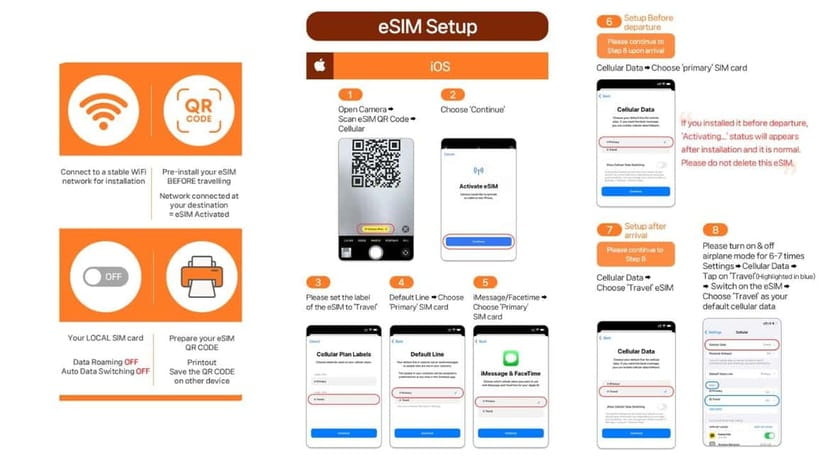
- Unlimited 4G LTE data without speed throttling (the big value driver here)
- QR code logistics matter: the voucher QR is not the eSIM QR, and the eSIM QR arrives by email
- Activation starts on SK Telecom the moment your eSIM connects on arrival (timed by your plan window)
- Voice and SMS are separate from data and require passport verification + a recharge step
- Hotspot sharing is supported, so you can power a laptop or another device
- Carrier is SK Telecom, which tends to mean strong coverage in built-up areas
What This Unlimited South Korea eSIM Really Gives You
This is a short-term eSIM product built for one job: get you reliable mobile data in South Korea without juggling local SIM cards. You’re buying unlimited data on SK Telecom’s network using a 4G LTE connection.
You also get an eSIM (not a plastic SIM). That matters because you don’t have to swap cards or hunt for an adapter when you arrive. For many people, the experience feels like: land, scan, connect, go.
One nuance: “unlimited” here is about data speed policy. The plan is listed as unlimited with no speed throttling, so you’re not capped quickly for streaming, maps, or messaging.
You can also read our reviews of more tours and experiences in Seoul.



Price vs. Value: $8 for 3 to 90 Days of Data
At around $8 per person, this is one of those “pay once, stop thinking” purchases—if your phone is eSIM-ready. The value comes from the combination of unlimited data plus a reputable carrier (SK Telecom) rather than a random reseller network.
Your best comparison point is not just cost per day. It’s what you’ll actually do with data: map-heavy days, ride-hailing, posting photos, and using translation apps. If you’ll be online constantly, unlimited data often costs less than paying for “large” but limited data packs.
Plans run from 3 to 90 days, so you can match it to a quick trip or longer visit. If your schedule is flexible, the “reserve & pay later” option can also reduce stress while you wait for airfare or final dates.
Before You Land: Device Checks That Prevent Headaches
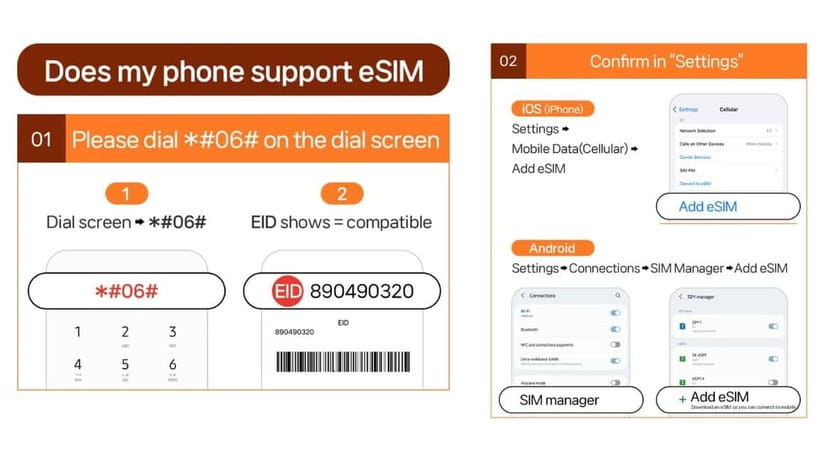
The biggest avoidable problem is buying an eSIM you can’t activate. Do the compatibility check before payment and before travel.
Here’s what you should verify:
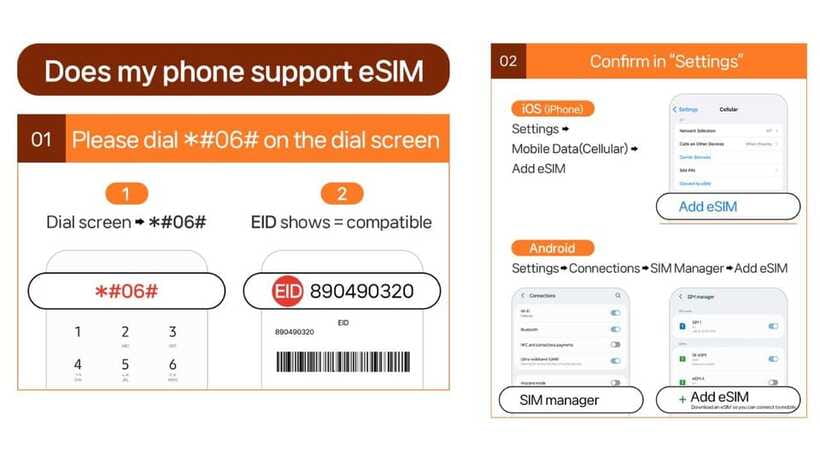
- Your phone supports eSIM. You can check by dialing #06# and looking for an EID.
- Your phone should be fully unlocked for a foreign SIM. The guidance calls out extra attention for phones from the US, Canada, Japan, or the Philippines.
- Your passport needs to be an overseas passport. Korean passport holders are not eligible.
Also confirm your expectations: the eSIM can’t be refunded once issued, so treat the compatibility check as a must-do step, not a “maybe.”
Finally, remember that voice and SMS have extra steps. If you only care about data, you’re usually set. If you need calling and texting, you’ll want time for verification and a recharge.
Activation Day in Korea: QR, Network Switch, and Timing
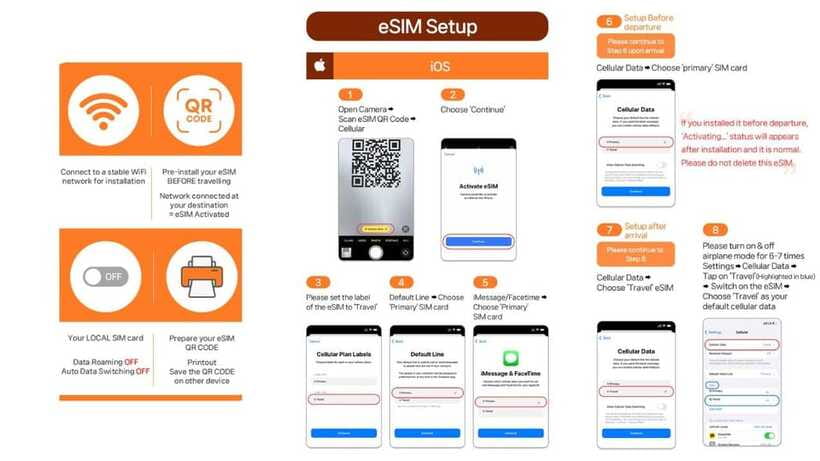
The QR codes can be confusing, and it’s worth getting this straight up front. The QR code shown on GetYourGuide’s voucher is not the eSIM QR code. The correct eSIM QR is delivered separately by email 1 day before your activity date.
When you arrive in Korea, the eSIM connects to the local network after you land. It won’t magically start while you’re still abroad.
Then activation timing depends on your plan window. The eSIM starts instantly when connected to SK Telecom, based on hours—for example, a 3-day plan can be activated at a specific time and end on a specific time the last day. Don’t wait until bedtime on arrival if you want the cleanest use of your first day.
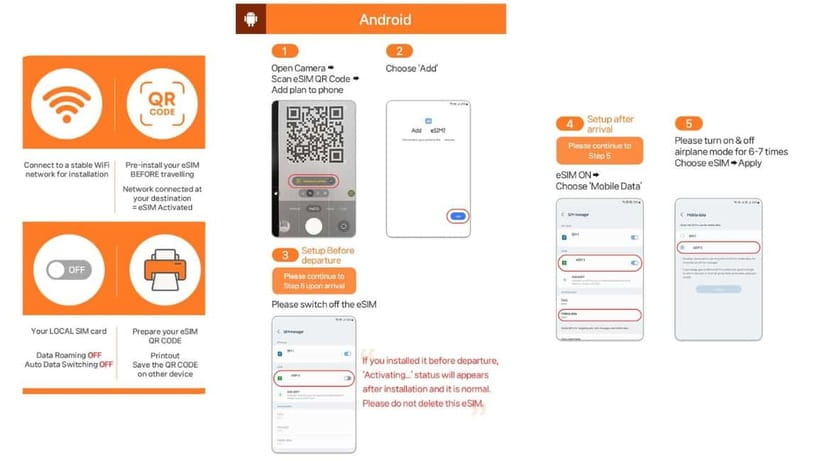
One practical tip: when the data feels “off,” check your phone’s SIM manager settings. If you see an error like QR code invalid, the guidance is to look for whether a new eSIM appears under Cellular/SIM Manager. If it’s missing, you may need to re-add the eSIM rather than keep retrying blindly.
Voice and SMS Setup: Passport Verification and Voice Credits
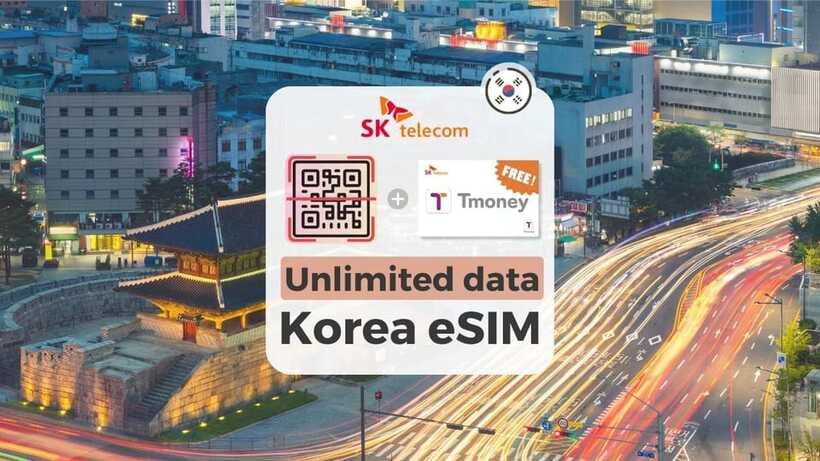
Data is the easy part. Voice and SMS have a second gate.
According to the setup rules, voice features use an online passport verification process on SKroaming. The system is available 08:00–22:00 every day, and verification can only be performed 1 hour after entry. That means you shouldn’t plan to activate calls and texts the moment you step off the plane.
You’ll also need to handle the extra registration details:
- A Korean phone number is provided after verification.
- Voice & text features can be enabled only after online verification.
- Only one phone number can be registered per passport.
There’s also a key limitation: the product includes incoming calls and text messages without additional charges, but outgoing calls and SMS are not included. So think of voice/text here as an arrival-number so people can reach you, not as a full outbound calling plan.
The plan also includes complimentary voice credits: 1,320 KRW voice credits (valid until Drp 20, which is around a few minutes of domestic calls in Korea). After that, you’d need to recharge using the charging website listed in the instructions.
If you expect heavy calling out to hotels, guides, or taxis, this setup might feel too limited. If you mainly need to be reachable, it’s fine.





How to Use It Like a Local: Data, Hotspot, and Everyday Apps
Once you’re on SK Telecom’s network, the goal is simple: use it without babysitting it. The product is designed for stable 4G LTE data access, and the hotspot sharing support is useful if you travel with a laptop, tablet, or a second phone.
What I recommend you do in the first hour after activation:
- Test one core app (maps or your navigation app).
- Send one message to verify text functionality if you’ve already done verification.
- If you’ll use a laptop, test hotspot once so you’re not debugging on the road.
This kind of test saves you from the most common “everything seems connected but nothing loads” moments that can happen when switching networks. If your phone has both Wi-Fi and cellular, also confirm cellular data is actually being used for your apps.
And if you run into trouble, you can contact the provider support line listed (email or WhatsApp). That matters because you don’t want to spend your first day chasing settings across multiple menus.
Troubleshooting When Things Look Off
Real life includes weird phone behavior, and this eSIM setup is no exception. One big warning from the instructions: if you see QR code invalid, don’t panic and don’t assume your phone is broken. Check whether your eSIM is showing up in your SIM manager.
Also check for two common gotchas:
- The wrong QR code: the voucher QR is not the eSIM QR.
- The order of operations: voice/SMS needs verification, but data should connect once you’re on SK Telecom.
One review-style lesson you should take seriously: if your installation takes a while, build in extra time. Installation can be fast for some phones, but other setups can take longer than expected. If you need your phone working for important logistics the same day, start the eSIM setup soon after arrival so you still have time to fix things.
If your data disconnects unexpectedly, don’t keep flipping everything on and off for hours. Pause, go back to the SIM manager, confirm the eSIM is active, then try the network connection again. If it still fails, contact LINK KOREA for assistance.
Is the Support Worth It? (The Human Side Matters)
This product isn’t just a QR card in an envelope. There’s human support involved if you hit problems.
The provider is LINK KOREA, and they provide help by email and WhatsApp. That’s especially useful if you’re dealing with a phone that doesn’t follow the typical installation flow.
One positive detail is that you might get clear guidance during the process, and the experience can feel straightforward when the setup is explained well. On the other hand, if you don’t get the eSIM added correctly the first time, it can become stressful fast, and you may end up fixing settings yourself.
So my practical advice is simple: don’t leave installation until you’re in a hurry. If you can, set aside time right after you land, even if it feels like “just a few minutes.”
Who Should Buy This eSIM Plan
This is a great fit if you:
- Want unlimited 4G LTE data with a big carrier
- Plan to rely on maps, translation apps, and constant messaging
- Have an eSIM-compatible and unlocked phone
- Mainly need inbound calls/text (not lots of outbound calling)
It’s not the best fit if you:
- Need outgoing calls/SMS included
- Will arrive during hours when you can’t complete passport verification right away (because voice/SMS activation has timing rules)
- Are unsure about eSIM compatibility and don’t want to risk a same-day troubleshooting session
If you’re traveling with a group and sharing a hotspot, this setup is handy because hotspot sharing is supported—but keep in mind voice features still require the verification process.
Should You Book This eSIM Plan?
If your phone supports eSIM and you’re okay treating voice as an extra step, this is a strong value. For about $8, you’re buying unlimited data on SK Telecom for a range of trips (3–90 days), and that can simplify everything from transit to meal decisions.
Book it if:
- You’re mostly data-focused.
- You’ll arrive with time to add the eSIM and test your connection.
- You’re okay doing voice/SMS verification after entry if you truly need it.
Skip it or be cautious if:
- You expect unlimited outbound calls and texts.
- You need voice features immediately without time for passport verification rules.
- Your phone isn’t fully unlocked or you’re unsure about eSIM support.
FAQ
Does the voucher QR code work as the eSIM QR?
No. The QR code on the GetYourGuide voucher is not the eSIM QR code. The correct eSIM QR code is delivered to you separately via email 1 day before the activity date.
How do I check if my phone supports eSIM?
Dial #06# and check whether EID shows. If no EID appears, the device may be incompatible with eSIM.
When does the eSIM start working in South Korea?
The eSIM starts instantly when connected to SK Telecom’s network, based on hours for your plan length. It connects after you arrive in Korea.
Is the data truly unlimited?
Yes. The plan is listed as unlimited 4G LTE data without speed throttling.
Does this eSIM support hotspot sharing?
Yes. Hotspot sharing is supported.
Can I use voice calls and SMS right away?
Not automatically. Voice & SMS require online verification. After verification, a Korean phone number is provided and services can be activated.
What hours are available for the passport verification step?
Operating hours are listed as 08:00–22:00 every day, and verification can only be performed 1 hour after entry.
Are outgoing calls and outgoing SMS included?
No. Incoming calls and text messages are included without additional charges, but outgoing calls and outgoing SMS are not included.
What should I do if I see an error like QR code is invalid?
Check your device for an eSIM entry. On iOS, look in Settings > Cellular. On Android, check Settings > Connections > SIM Manager and see whether a new eSIM is showing. If you still can’t fix it, contact the supplier via the provided email or WhatsApp.